Today iam writing about IBM......
International Business Machines (IBM) (NYSE: IBM) is a United States multinational technology and consulting firm headquartered in Armonk, New York. Founded in 1911, IBM manufactures and sells computer hardware and software, and it offers infrastructure, hosting and consulting services in areas ranging from mainframe computers to nanotechnology.
Source:Wikipedia
International Business Machines (IBM) (NYSE: IBM) is a United States multinational technology and consulting firm headquartered in Armonk, New York. Founded in 1911, IBM manufactures and sells computer hardware and software, and it offers infrastructure, hosting and consulting services in areas ranging from mainframe computers to nanotechnology.
 | |
| Type |
|
|---|---|
| Industry | |
| Founded | Endicott, New York June 16, 1911 |
| Headquarters | Armonk, New York |
| Area served | Worldwide |
| Key people | |
| Revenue |  US$ 95.75 billion (2009) US$ 95.75 billion (2009) |
| Operating income | US$ 17.01 billion (2009) |
| Net income | US$ 13.42 billion (2009) |
| Total assets |  US$ 109.02 billion (2009) US$ 109.02 billion (2009) |
| Total equity | US$ 22.63 billion (2009) |
| Employees | 399,409 (2009) |
| Subsidiaries | |
| Website | ibm.com |
Source:Wikipedia

 It is possible to set the default web browser in Windows XP by going through Internet Explorer's Options, like we did in the tutorial explaining how to
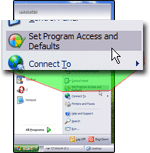
  Open the Start Menu, and click Set Program Access and Defaults: this will open the Add or Remove Programs window, with the Set Program Access and Default button selected on the left.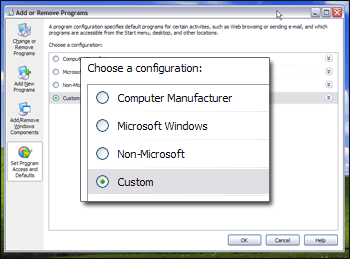
 Click on the Custom double arrow, and Windows XP will list all the default programs options it found for Default Web Browser, Default E-mail Program, and Default Media Player: under "Choose a default Web browser", you will see an entry for each application Windows XP has recognized as being a web browser. The screenshot below shows the settings for one particular computer, and what you see will vary, based on installed browsers.
 Select a default browser for Windows XP
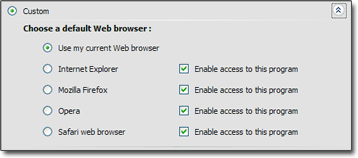 Don't forget to confirm your new default browser by clicking the OK button; next time you open a website, it will launch in the default browser you selected.
  Testing the default browser settings in Windows XP
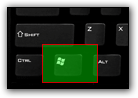 Here is a quick and easy way to test if your change of default web browser has been applied successfully: press the Windows logo key on your keyboard and press R at the same time: this will open the "Run" dialog.